
Configuration Parameters for Optibot: Reviews
The Reviews settings control automated code review functionality per repository. Access them from your Optibot dashboard at agents.getoptimal.ai → select a repository → Settings tab → Reviews section.
Auto Review on PR Creation
Setting: Auto review | Type: boolean | Default: Off
Controls whether Optibot automatically reviews pull/merge requests when they are created.
When to use: Turn on if you want immediate feedback on all pull requests when they are first opened. Turn off if you prefer to manually trigger reviews. You can always do this by typing Optibot can you review this in any PR or MR comment.
Auto Review on New Commits
Setting: Auto review on push | Type: boolean | Default: Off
Configures Optibot to automatically re-review a pull or merge request every time new commits are pushed. Push reviews are incremental by default. Each review focuses on what changed since the last push, so feedback gets more targeted as you iterate and the PR thread stays clean.
To trigger a complete from-scratch review at any time, comment #optibot full review on the PR. On force-push or rebase, Optibot automatically runs a full review to ensure nothing gets missed.
When to use:
- Ideal when you push multiple follow-up commits to address feedback
- Each push gets a focused review on the latest changes, with no repeated feedback and no noise
- Helps teams maintain high-quality, iterative review workflows
Auto Review After CI Workflow
Setting: Auto review after workflow | Type: boolean | Default: Off
Triggers a review only after a CI workflow completes rather than immediately on PR open. Useful if you want Optibot to review post-build, once you know the branch is in a stable state.
Automated PR Approvals
Setting: Allow approve | Type: boolean | Default: Off
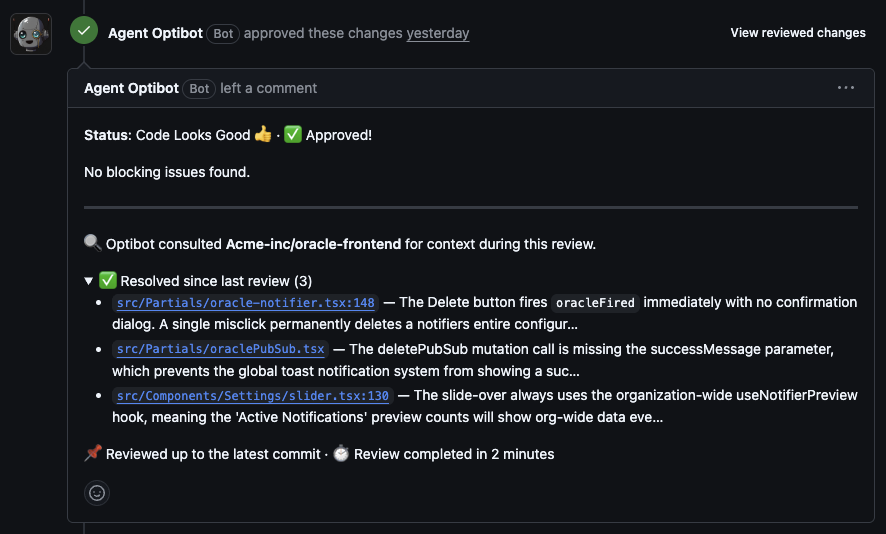
Gives Optibot the ability to automatically approve pull/merge requests once all blocking issues are resolved. Fix the blockers, push, and Optibot approves the PR automatically, with no manual re-review request needed.
Every review summary shows which blockers are still open and which have been resolved, so you always know exactly where the PR stands.
When to use:
- For trusted contributors or automated dependency updates
- When you have strict CI/CD checks and trust Optibot’s judgment
- When you require multiple approvals to merge, since Optibot’s approval can count as one
⚠️ Use carefully. This gives Optibot approval authority. Best combined with Excluded Labels or Excluded Users.
Recommended setup: Enable Auto Review on push, enable Allow Approve, and add excluded labels like needs-review and breaking-change.
Request Changes for Blocking Reviews
Setting: Request changes | Type: boolean | Default: Off | GitHub only
When enabled alongside Allow Approve, Optibot submits a formal GitHub “Request Changes” review when it finds blocking issues, rather than posting a plain comment. This integrates with GitHub branch protection rules to prevent merging until every blocker is resolved and the PR is approved.

When to use:
- When your repository uses branch protection rules that require a resolved “Request Changes” before merging
- For teams that want Optibot to act as a formal reviewer in the GitHub review flow, not just a commenter
Code Suggestions
Setting: Code suggestions | Type: boolean | Default: On
Allows Optibot to generate inline code suggestions and improvements during reviews. Suggestions appear as committable changes directly in the PR.
Turn off if you only want high-level feedback without specific code changes.
Post Outside-Diff Findings as Comments
Setting: Post outside-diff findings as comments | Type: boolean | Default: Off | GitHub only
Optibot reads beyond the files a pull request changes, so it can catch the caller that still passes the old argument or the consumer of a string you just renamed. GitHub, however, only allows a review comment on a file that is part of the diff. By default those findings are collected into a “findings outside this PR’s diff” section in the review body.
Turn this on and each one is posted as its own review thread instead.

How the comment is placed
Since GitHub will not accept a comment on an unchanged file, Optibot anchors the thread to the changed file closest to the finding’s real location. The file GitHub displays the comment on is therefore not the file the issue is in, so every comment opens with a 📍 Actual location: line giving the true file and line range.

Dismissing a finding
Resolving the thread, or reacting 👎 to the comment, dismisses the finding, and it will not be raised on later reviews. In this mode that replaces the Dismiss link used by the review-body section, since the GitHub controls you already use do the same job.
Behavior notes
- Code suggestions are removed from these comments. A committable suggestion would be applied to the anchor file, which is the wrong file, so suggestion blocks are stripped rather than offered.
- Findings covering the same file and line range are posted once. They share a dismissal, so duplicate threads would be noise.
- If a comment cannot be posted, the finding still appears in the review summary with its Dismiss link intact. A finding is never dropped.
- Not available on GitLab. GitLab already posts these findings as separate merge request notes, so the setting is hidden for GitLab repositories.
When to use:
- Outside-diff findings are being scrolled past at the bottom of the review summary
- You want your team to resolve them with the same Resolve conversation button they use for every other comment
- You track review feedback through threads rather than through the review body
When to leave it off:
- You prefer the review summary to be the single place every finding is reported
- Additional threads on a large pull request would be more noise than signal
Skip Files
Setting: Skip files | Type: array of glob patterns | Default: Empty
Tells Optibot to skip reviewing certain files based on glob patterns. Optibot will not generate suggestions on matching files and will not read them during a review.
When to use:
- Exclude auto-generated files, test files, or documentation
- Skip files with legal requirements against AI-generated code
Pattern examples:
Skip test files and documentation:
*.test.js, *.test.ts, *.md, docs/**/*Skip generated and configuration files:
*.generated.*, dist/**/*, build/**/*, *.config.js, package-lock.jsonSkip vendor and third-party code:
vendor/**/*, node_modules/**/*, third_party/**/*Glob pattern reference:
*.ext: files with that extension in the repo root only**/*.ext: files with that extension in any directory (recursive)dir/**/*: all files under a specific directory
Review Sensitivity
Setting: Sensitivity | Type: string (Low / Medium / High) | Default: Medium
Controls how aggressively Optibot flags issues in your code.
| Level | Behavior |
|---|---|
| Low | Only reports high-confidence, critical issues such as bugs and security vulnerabilities |
| Medium | Balances critical findings with important improvements. Recommended for most teams. |
| High | Reports everything, including minor issues and stylistic concerns |
Excluded Labels
Setting: Excluded labels | Type: array of strings | Default: Empty
Prevents Optibot from reviewing PRs or MRs that carry any of the specified labels. Labels are case-sensitive.
Examples:
Skip WIP and draft PRs:
WIP, work-in-progress, draftEmergency bypass:
hotfix, emergency, critical-fixExcluded Users
Setting: Excluded users | Type: array of strings | Default: Empty
Prevents Optibot from reviewing PRs or MRs opened by specified usernames.
Examples:
Exclude dependency bots:
dependabot, renovate, renovate[bot]Exclude CI/CD bots:
github-actions[bot], gitlab-ci, release-botAuto Review on Draft
Setting: Auto review on draft | Type: boolean | Default: Off
When turned on, Optibot will review pull or merge requests that are in draft state. By default, Optibot skips draft PRs and only reviews once the PR is marked “Ready to review”.
Suppress Repeated Issues
Setting: Suppress repeated issues | Type: boolean | Default: Off
When enabled, issues that were already raised in a previous review on the same PR are moved to a collapsible section instead of being posted again as new inline comments. Reduces noise on PRs with multiple review cycles.
Note: All settings are per-repository. Changes take effect immediately for new PRs and MRs, with no commits or deployments required.