
Optibot Features
Streamline your engineering workflow with Optibot, an AI-powered GitHub agent that reviews code, generates release notes, enforces compliance, bundles dependencies, and analyzes CI failures.
Most features run directly inside pull requests, so your team can focus on shipping, not manual reviews.
Code Review
Optibot automatically reviews your pull requests with context-aware analysis.
- Summarizes PR changes
- Marks PRs as Ready to Merge or Needs Changes
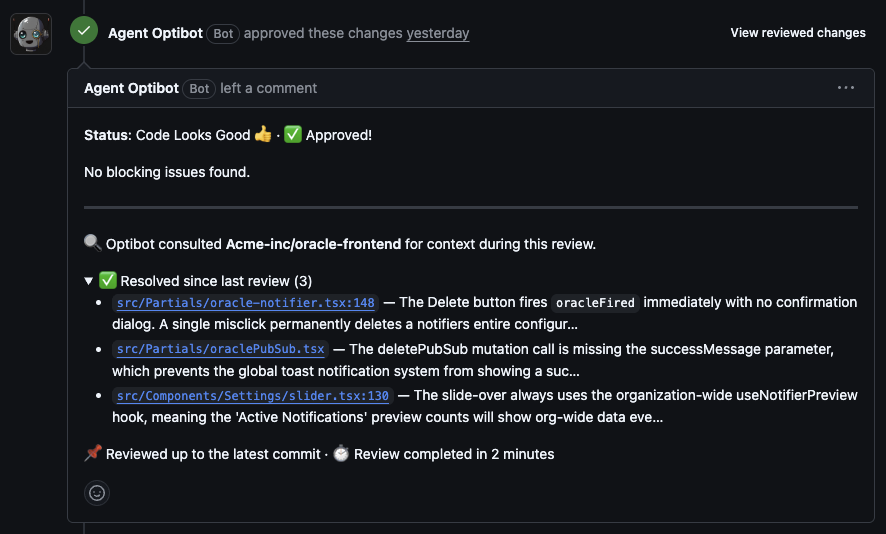
- Leaves inline comments on code, with a clear blocker / non-blocker label on every finding
- Every review summary shows what’s still open and what’s been resolved, so you always know exactly where the PR stands
- Ranks feedback by confidence level
Push reviews get sharper with every commit. Feedback focuses on your latest changes and the PR thread stays clean as you iterate.
Trigger manually in a PR comment:
#optibot reviewReviews your latest changes. For a complete review of the entire pull request:
#optibot full reviewOr comment: Optibot, please review this PR
Jira Issue Validation
If your organization has Jira connected, Optibot finds the ticket a pull request implements and checks whether the code changes actually deliver what the ticket asks for. The result appears as a Jira Issue Validation section in the review summary, with the issue type, status, and an alignment analysis.
Where Optibot looks for the ticket
Optibot reads the issue key from the pull request title first, then falls back to the branch name. It does not scan the PR description, because descriptions routinely reference other tickets (“blocked by”, “follow-up to”, “see also”), which leads to the wrong ticket being picked.
Any of these work in the title:
| Format | Example |
|---|---|
| Square brackets | [ABC-123] Fix login redirect |
| Parentheses | (ABC-123) Fix login redirect |
| Plain prefix | ABC-123 Fix login redirect |
| Prefix with colon | ABC-123: Fix login redirect |
If the title has no key, Optibot checks the branch name, so feature/ABC-123-fix-login also works.
💡 Tip: Issue keys must be uppercase when written without brackets or parentheses, matching Jira’s own format (
ABC-123, notabc-123). Inside brackets or parentheses, either case works.
If a PR title references several tickets, Optibot validates against the first one.
When no validation appears
If Optibot can’t find a matching issue, it stays quiet rather than adding noise to your review. The one exception is a key you wrote explicitly in brackets or parentheses: if that issue doesn’t exist or isn’t accessible to your Jira service account, Optibot flags it so you can correct a typo or fix permissions.
Dismiss Findings Outside the Diff
Some of Optibot’s most useful observations aren’t tied to a specific line: architectural notes, patterns spotted across the PR, broader code health signals. When one doesn’t apply to your situation, you can now dismiss it with a single click. Once dismissed, it won’t resurface on future reviews.
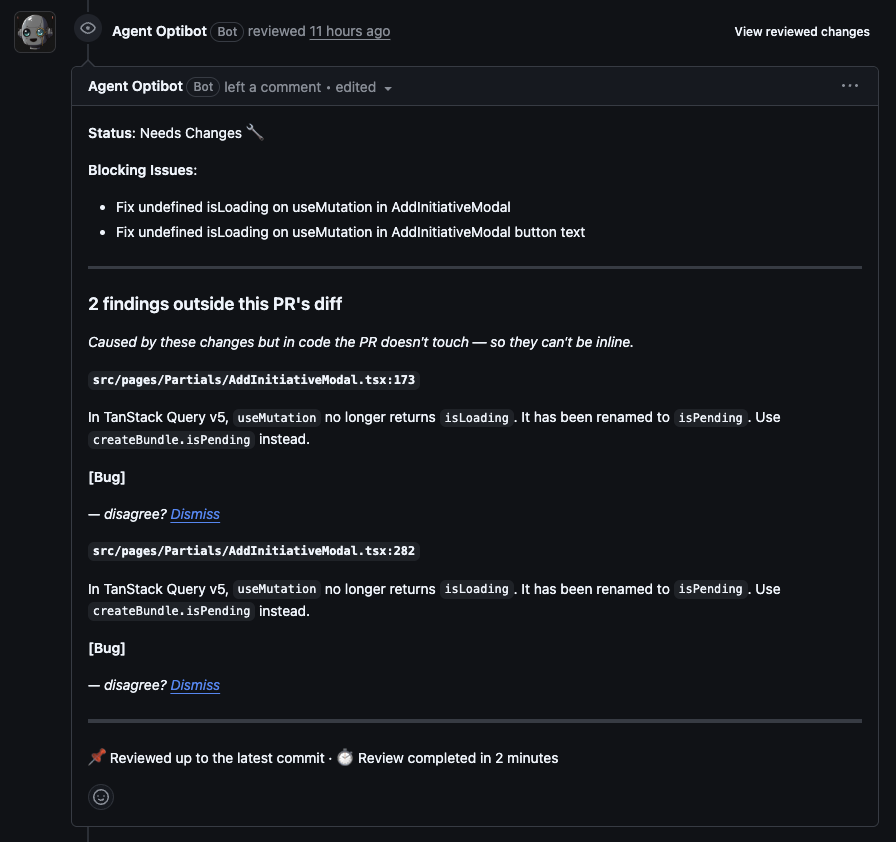
On GitHub you can also have these findings posted as their own review threads rather than as a section in the review summary. Each thread is anchored to the nearest changed file and states the finding’s true location, and resolving it dismisses the finding. See Post outside-diff findings as comments.
Release Notes
Turn technical updates into customer-ready release notes.
- Groups updates into Features, Improvements, Bug Fixes
- Clear, professional formatting for external sharing
#optibot release notesCompliance Checks
Automated SOC2 and security compliance scans directly in your PRs.
- Flags risky code (API keys, permissions, data exposure)
- Maps findings to SOC2 principles
- Provides recommended fixes
#optibot complianceDependency Bundler
Stop managing dozens of noisy Dependabot PRs.
- Bundles dependency updates into one clean PR
- Summarizes key changes and flags breaking updates
- Saves hours of manual review
Enable via .optibot configuration:
"dependencyBundler": { "enabled": true }CI Fixer Agent
Debug CI failures automatically. The CI Fixer Agent detects failed workflows, analyzes logs, and automatically repairs code errors, restoring your build to green without manual intervention.
What it does
When a CI run fails, Optibot instantly posts an automated comment with the error details and affected files. The CI Fixer Agent then:
- Detects the failed CI run in a pull request
- Reviews the error logs and identifies affected files
- Applies targeted fixes directly to the branch
- Posts a PR comment summarizing the issue, changes, and context
Code Context, Search, and Judgment
Optibot is built on three foundations:
Code Context
Every review is grounded in your entire repository. Instead of treating a pull request as isolated text, Optibot considers dependencies, history, and team conventions.
Code Search
Optibot’s built-in search surfaces relevant references instantly, making it easy to see how similar challenges were solved and reducing duplicate work.
Judgment
Optibot applies reasoning to separate critical issues, like security risks or performance bottlenecks, from minor style concerns. Developers stay focused on what matters most.
Configuration File
Fine-tune Optibot using a .optibot file in your repo root:
{
  "reviews": {
    "auto": true,
    "autoApprove": true,
    "requestChanges": true,
    "excludedLabels": ["do not review"]
  },
  "dependencyBundler": { "enabled": true },
  "summary": { "auto": true, "level": "basic" },
  "guidelinesUrl": "https://github.com/your-org/your-guidelines.md",
  "enableCIFixer": true
}
Key Options
| Option | Description |
|---|---|
reviews.auto | Auto Reviews & Summaries, always-on reviews |
reviews.autoApprove | Auto-approve when all blockers resolve across pushes |
reviews.requestChanges | Submit formal GitHub “Request Changes” for blocking reviews (GitHub only, requires autoApprove) |
reviews.excludedLabels | Skip PRs with specific labels |
guidelinesUrl | Enforce company coding standards |
dependencyBundler | Consolidate dependency PRs |
enableCIFixer | Debug failed builds automatically |
Why Optibot?
✅ Faster reviews
✅ Cleaner releases
✅ Built-in compliance
✅ Reduced PR clutter
✅ Smarter CI debugging
Optibot acts as your 24/7 AI reviewer, helping teams ship secure, reliable, and well-documented code.