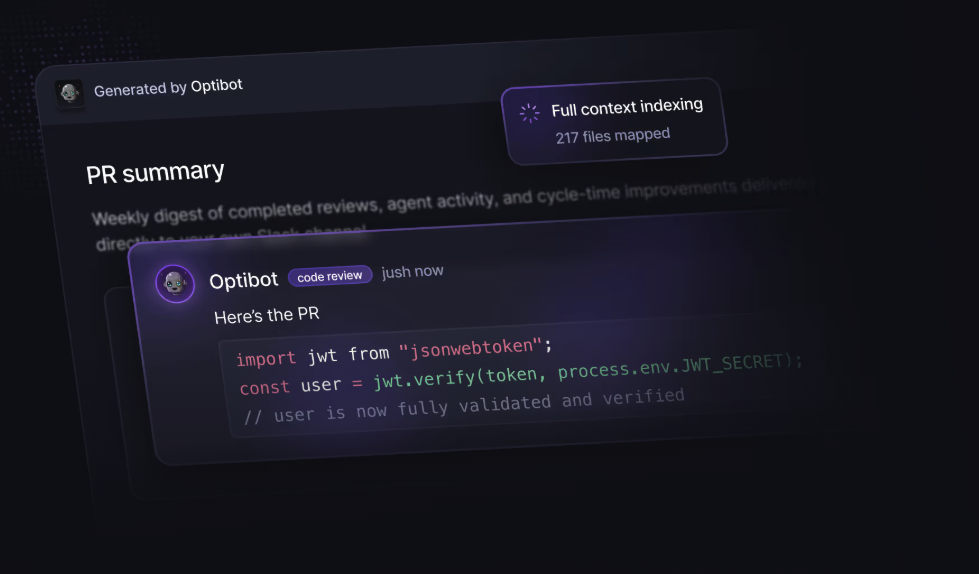
The AI code review market has grown fast. Too fast. In 2026, there are more than a dozen tools claiming to "review your code," but most of them differ dramatically in what they actually do. Some only scan the lines you changed. Others understand your entire codebase. A few also track whether your team is getting faster or slower. Almost none of them are transparent about how their pricing scales with your team's PR volume.
We evaluated nine tools that engineering teams actually use: Optibot, CodeRabbit, Greptile, Qodo, GitHub Copilot Code Review, Cursor BugBot, SonarCloud, Amazon Q Developer, and Sourcegraph Cody. We focused on the dimensions that matter most: how deeply a tool understands your codebase, whether it catches security vulnerabilities, what engineering analytics it surfaces, and what it actually costs at scale.
How we evaluated these tools
Every tool on this list claims to "improve code quality." We wanted specifics. Here's the framework we used, the same one we hear engineering leaders use when they're making a purchasing decision:
- Codebase context depth. Does the tool review just the changed diff, or does it understand how those changes affect your entire codebase? Cross-file bugs and architectural regressions only show up if a tool reads beyond the PR.
- Security scanning quality. Is it a single-pass static scan, or multi-pass with CVE/CWE database matching? How many categories of vulnerabilities does it cover?
- Engineering analytics. Does the tool help you understand patterns: why PRs slow down, who the bottlenecks are, how AI adoption is changing your team's velocity?
- Platform support. GitHub-only, or does it support GitLab (cloud and self-hosted)? Bitbucket? Azure DevOps?
- Total cost at scale. Flat per-seat, usage-based, or bundled with another subscription? At 20 engineers shipping 15 PRs/month each, what's the actual monthly bill?
The 9 best AI code review tools in 2026
Listed in order of our overall recommendation. Scroll past the list for the side-by-side comparison table.
Multi-model review on every PR, unlimited cross-repo codegraph, and memory that compounds. Flat $29/user
Optibot is the only tool on this list that combines deep, full-context code reviews with built-in engineering productivity analytics. Where most tools stop at the PR review, Optibot also tracks PR cycle time, DORA metrics, AI code adoption ratios, and sprint health, giving engineering leaders visibility into both code quality and delivery speed in the same dashboard.
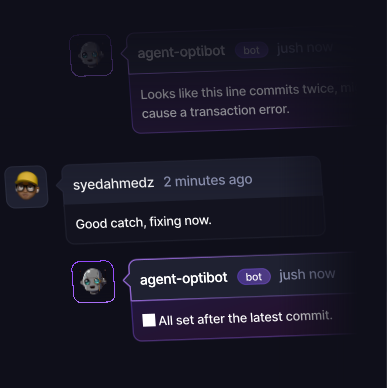
On review quality, Optibot indexes your entire codebase on every push and runs multi-pass security scanning that catches significantly more vulnerabilities than single-pass tools. Reviews post as inline comments on GitHub and GitLab PRs, with VS Code and Cursor extensions for resolving issues in-editor. At $29/user/month, flat pricing that doesn't spike as you ship more, it's the most predictable pricing model in the category.
Pros
- Full codebase context (not diff-only)
- Multi-pass security scanning + CWE/CVE matching
- Built-in engineering metrics: cycle time, DORA, AI adoption
- Flat $29/user/month, no spike as you ship more
- GitHub + GitLab (cloud and self-hosted)
- VS Code and Cursor IDE extensions
- Autonomous CI fixing agent
- SOC 2 Type II certified
Cons
- No Bitbucket or Azure DevOps (in development)
- No free tier for open-source repos
Optibot traces every finding back to the specific files and types in your codebase, not just the diff.
Cross-repo context capped at 1 linked repo on Essentials and 5 on Team; reviews skipped past 150 changed files
CodeRabbit is one of the most widely-used AI code review tools, driven largely by its generous free tier for public repositories. It supports the broadest platform coverage of any tool on this list: GitHub, GitLab, Bitbucket, and Azure DevOps, making it a natural default for teams on non-GitHub SCMs.
CodeRabbit indexes the codebase and builds a code graph across it, so on an everyday pull request the review holds up. The limitation is the ceiling and the bundle. CodeRabbit skips the automatic review once a pull request passes 150 changed files on Pro (300 on Pro Plus), which is exactly where migrations, framework upgrades, and monorepo-wide renames land, and comprehensive security scanning is a separate $40 per user per month add-on. There is also no engineering analytics layer at any tier, so cycle time, DORA metrics, and AI code adoption have to come from a second tool.
Pros
- Free tier for public/open-source repos
- Broadest platform support (GitHub, GitLab, Bitbucket, Azure DevOps)
- Large existing user base and documentation
Cons
- Automatic review skipped past 150 changed files (Pro)
- Comprehensive security scanning is a $40/user/mo add-on
- No engineering productivity metrics at any tier
- Hourly review throttle tightens as a developer ships more
50 credits per seat, then $1 per extra review; a deep review burns 3 credits
Greptile is the strongest pure code-review alternative if full codebase context is your priority and you don't need engineering analytics. Like Optibot, Greptile indexes your entire codebase (not just the diff) and uses that context to catch bugs that diff-only tools miss. Its code search and understanding capabilities are technically well-regarded.
The main gaps compared to Optibot: no engineering productivity metrics (no cycle time, DORA, or AI adoption tracking), 50 credits per seat per month with deeper reviews costing 3 apiece, so the bill scales with volume past roughly 16 of them, and no IDE extension for in-editor fix resolution.
Pros
- Full codebase context (not diff-only)
- Strong code search and logic bug detection
- Native GitHub App, inline PR comments
- GitLab cloud support
Cons
- No engineering productivity analytics
- Usage-based pricing scales with PR volume
- No VS Code or Cursor extension
- No self-hosted GitLab support
💡 Key insight
The most important differentiator in AI code review isn't the LLM model: it's the context window. A tool that only reads your diff will always miss the bugs that only appear when you read the whole codebase. This is why full-context tools consistently outperform diff-only tools on complex, multi-file changes.
Bitbucket and Azure DevOps coverage, but governance features gated to enterprise tiers
Qodo (rebranded from CodiumAI in 2024) is the most enterprise-focused tool on this list. It ships both a coding assistant (Qodo Gen) and a PR review product (Qodo Merge). Qodo Merge's standout feature is a rules engine: teams can define and enforce custom coding standards that persist across all PRs. For large organizations with strict governance requirements, this is a genuine differentiator.
Like CodeRabbit, Qodo supports Bitbucket and Azure DevOps alongside GitHub and GitLab, making it one of the two options for non-GitHub/GitLab teams. The tradeoff is complexity: the dual-product setup requires more configuration than Optibot or Greptile, and pricing is less transparent.
Pros
- GitHub, GitLab, Bitbucket, and Azure DevOps
- Strong rules engine for enforcing team standards
- Dual product: coding assistant + PR review
- Enterprise governance and audit features
Cons
- Complex setup vs. Optibot/Greptile
- No engineering productivity metrics
- Less transparent pricing
- Dual-product overhead for smaller teams
Bundled with Copilot Business, but GitHub-only with no engineering metrics at any tier
GitHub added pull request review to Copilot in 2025. For teams already paying for Copilot Business or Enterprise, it adds inline review comments at no additional per-seat cost. The value proposition is simple: if you're already paying for Copilot, you get basic review functionality "for free."
The limitations are real, though: diff-only analysis, GitHub-only (no GitLab), no engineering analytics, and review quality that lags behind purpose-built tools like Optibot and Greptile. It's a useful convenience add-on, not a replacement for a dedicated code review tool.
Pros
- Included with existing Copilot subscriptions
- No new tool to install for GitHub-native teams
- Familiar GitHub UI
Cons
- Diff-only (misses cross-file bugs)
- GitHub only (no GitLab, Bitbucket, Azure DevOps)
- No engineering analytics
- Review quality behind purpose-built tools
Same code change: the difference is what the reviewer understands beyond the changed lines.
Billed per run, and only worth it if the whole team already codes in Cursor
Cursor's BugBot is a PR review add-on launched mid-2025. It leverages Cursor's codebase indexing to review pull requests and post comments on GitHub. The product makes sense only if your entire team already uses Cursor as their primary IDE, tightly coupled to Cursor's ecosystem.
At $40/user/month as an add-on (on top of the required Cursor Business subscription), BugBot is priced above purpose-built dedicated tools like Optibot that offer more features. At 20 engineers, you're looking at $800/month just for BugBot on top of your Cursor subscription, versus $580/month for Optibot with engineering analytics included.
Pros
- Tight integration with Cursor codebase indexing
- Familiar setup for existing Cursor users
- GitHub PR integration
Cons
- Only valuable if entire team uses Cursor
- $40/user/mo add-on on top of Cursor subscription
- No engineering analytics
- Limited GitLab support
- More expensive than dedicated alternatives
A static analysis quality gate, not a codebase-aware reviewer
SonarCloud is the cloud offering of Sonar's static analysis platform (the same engine behind the widely-used SonarQube self-hosted product). It's a different category from the AI review tools above: it's primarily a static analysis and code quality gate rather than an AI-powered contextual reviewer. SonarCloud is excellent at what it does: enforcing code quality thresholds, detecting security hotspots in known vulnerability categories, and blocking merges on coverage regression.
The limitations of the pure static analysis approach: it doesn't understand your specific codebase's architecture or conventions, doesn't catch business logic bugs, and doesn't provide narrative feedback the way AI reviewers do. Many teams run SonarCloud alongside an AI reviewer for complementary coverage. Free tier available for public repos.
Pros
- Mature, battle-tested static analysis engine
- Strong security hotspot detection by OWASP/CWE category
- Free tier for public repos; reasonable pricing for private
- Broad language support (27+ languages)
- CI/CD gate enforcement with quality profiles
Cons
- No codebase-level contextual understanding
- Doesn't catch business logic or architectural bugs
- No AI-generated narrative review comments
- No engineering productivity metrics
- High false-positive rate on complex codebases
"Static analysis tools like SonarCloud and AI contextual reviewers like Optibot are not substitutes; they're complements. Static analysis finds pattern-matched vulnerabilities reliably and fast. AI contextual review finds the bugs that only appear when you understand the architecture."
Tied to the AWS ecosystem; value drops sharply outside it
Amazon rebranded CodeWhisperer as Amazon Q Developer in 2024, bundling coding assistance, code review, and security scanning under one umbrella. For organizations deeply embedded in the AWS ecosystem (AWS SSO, IAM policies, CloudFormation, CDK), Q Developer has relevant context that generic AI tools lack: it understands AWS service patterns and can flag infrastructure misconfigurations at the code level.
Outside the AWS ecosystem, Q Developer's advantages largely disappear. The review quality for general application code is comparable to GitHub Copilot Reviews, adequate for basic coverage, but not competitive with full-context tools like Optibot or Greptile. The integration story also requires AWS Builder ID or IAM Identity Center, which adds friction for non-AWS organizations.
Pros
- AWS-specific security scanning (IAM, S3 permissions, CDK)
- Free tier for individual developers
- Integrates with JetBrains, VS Code, and AWS Cloud9
- Pro tier includes code transformation features
Cons
- Strong value only for AWS-heavy codebases
- No full codebase context for PR review
- No engineering analytics
- AWS ecosystem lock-in
- Limited GitLab and Bitbucket support for PR review
A code assistant on Sourcegraph, not a dedicated pull request reviewer
Sourcegraph Cody is primarily a coding assistant rather than a dedicated PR reviewer, but it deserves a mention because Sourcegraph's code search indexing gives it genuine codebase context. For teams already running Sourcegraph Enterprise for code search, Cody adds AI-powered code suggestions, Q&A, and some PR-level code review capabilities on top of the existing graph.
Cody's PR review functionality is secondary to its coding assistant capabilities. It's not as purpose-built for systematic PR review as Optibot, CodeRabbit, or Greptile. The main reason to consider it is if your organization already has a Sourcegraph license and you want to consolidate tooling.
Pros
- Leverages Sourcegraph's code search graph for context
- Strong for large monorepos with Sourcegraph already deployed
- Broad IDE support (VS Code, JetBrains, Neovim, Emacs)
- Self-hosted option for enterprise
Cons
- PR review is secondary to coding assistant functionality
- Requires Sourcegraph license for full context features
- No engineering analytics
- Complexity and cost of full Sourcegraph deployment
Optibot is the only tool that combines full codebase context with engineering analytics. Free trial, no credit card. Set up in under 10 minutes.
Side-by-side comparison: all 9 tools at a glance
Here's how the nine tools stack up across our five evaluation criteria. "Full context" means the tool indexes beyond the PR diff. "Eng. metrics" means the tool provides engineering productivity analytics (cycle time, DORA, etc.).
The bugs that never appear in the changed lines
The defects that reach production are rarely visible in the diff. Someone adds a field in create and never mirrors it in update. New code reads a field the schema still allows to be null. A file carries a "keep in sync with" comment and only one side gets updated. A payload shape changes and the service consuming it does not. None of that shows up in the changed lines, which is where a review that reads the diff and a little around it stops looking.
Optibot is built to catch these. Multi-model review means the change is examined more than once and not by the same reasoning twice, and the reviewer is looking for known classes of defect rather than reading the diff and stopping.
- Nullability drift. The schema still allows a field to be null. The new code assumes it is always there.
- Unmirrored siblings. A change lands in
createand never reachesupdate,delete, orbatch. - One-sided contracts. Two places are meant to stay in sync. Only one of them changed.
- Cross-repo breaks. A contract changed here. The service consuming it did not.
- The unreviewed remainder. The part of a large change a single pass never gets to.
Findings are held to a high bar rather than turned loose on your team. Every comment points at code, not at a guess, and blocking status is reserved for a concrete security vulnerability, breaking bug, data-integrity violation, or broken contract. Fixes arrive as applyable suggestions where they fit on the line.
This runs on every review, on every pull request size, at no extra cost. Optibot applies no per-pull-request file cap, so a 400-file migration gets the same treatment as a 4-file fix. It is worth asking any other vendor what happens to a change too large to review in one pass: the answers range from skipping it, to reviewing part of it without telling you, to charging per file to review the rest.
Engineering analytics: the feature most teams are missing
One of the most striking findings from our evaluation: only one tool (Optibot) offers engineering productivity analytics as part of the code review platform. Every other tool stops at the PR level, telling you what's wrong with individual pull requests but not helping you understand patterns across your entire engineering organization.
This matters more than most teams realize. PR review quality is one input to engineering velocity. But it doesn't tell you why your median PR cycle time increased from 18 hours to 26 hours last quarter, or which engineering bottlenecks are causing your deployment frequency to drop. Those questions require a different layer of visibility.
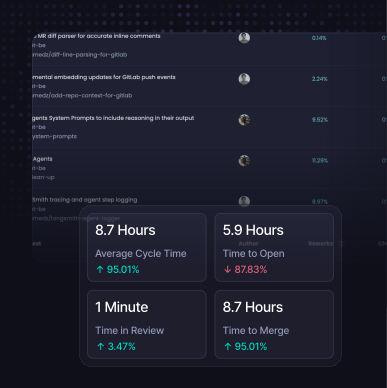
The metrics that engineering leaders consistently track:
- PR cycle time: average time from first commit to merge. Industry median is 18–24 hours for healthy teams; Optibot customers average closer to 9–14 hours.
- Review turnaround time: how long PRs sit waiting for a human reviewer. This is often the biggest single driver of cycle time.
- Deployment frequency: a core DORA metric. High-performing teams deploy multiple times per day; medium-performing teams deploy weekly.
- AI code adoption ratio: what percentage of your code is AI-generated vs. human-written, and whether that ratio is increasing. Increasingly important for teams using Claude Code, Cursor, or Copilot heavily.
- Contributor productivity: per-engineer PR volume, review participation, and output trends over time.
Pricing at scale: what 20 engineers actually costs
Usage-based pricing sounds reasonable until your team starts shipping frequently. Here's what each tool actually costs at 20 engineers shipping 15 PRs per engineer per month (300 total PRs/month):
| Tool | 20 engineers, 15 PRs/user/mo | Notes |
|---|---|---|
| Optibot Plus | $580/mo | Includes engineering analytics. Flat. |
| CodeRabbit | ~$600–$900/mo | Depends on review depth used. Scales with PRs. |
| Greptile | $30/seat + credits | Contact for current rates |
| GitHub Copilot + Reviews | $380–$780/mo | Reviews bundled; diff-only quality |
| Cursor BugBot | $1,600+/mo | $40/user BugBot + $40/user Cursor Business |
The Cursor BugBot cost is particularly striking. At $40/user/month as an add-on to the required Cursor Business subscription ($40/user/month), you're paying $80/user/month total, more than double Optibot's rate, for a product with fewer features.
If your team is currently on Cursor BugBot or Claude Code Review, our free BugBot cost calculator and Claude Code cost calculator can model the exact savings for your team size and PR velocity.
Our recommendation by team type
There's no single right answer: the best tool depends on your team's size, SCM platform, and whether you need engineering analytics. Here's a fast decision framework:
- For most engineering teams (GitHub or GitLab, 5–200 engineers): Optibot. Full codebase context, engineering analytics, flat pricing, and the fastest setup on this list.
- For open-source projects or teams needing Bitbucket/Azure DevOps: CodeRabbit (for free/open-source) or Qodo (for enterprise governance).
- For teams that want only code review quality without analytics: Greptile, the strongest pure reviewer after Optibot.
- For AWS-heavy codebases: Amazon Q Developer alongside a full-context reviewer.
- For teams that want a CI quality gate, not conversational review: SonarCloud alongside an AI reviewer.
- Teams already on Sourcegraph Enterprise: Cody is a natural add-on, not a primary choice.
The bottom line
Most AI code review tools in 2026 will catch the easy stuff: obvious null pointer risks, missing input validation, stylistic inconsistencies. The real differentiator is codebase context: whether a tool can understand what your change means for the rest of your system, not just what the diff contains.
For engineering teams serious about code quality, the choice narrows quickly: Optibot if you want full context plus engineering analytics in one product; Greptile if you want full context without analytics; CodeRabbit if you need Bitbucket/Azure DevOps or have a free-tier use case.
Every tool on this list offers a free trial or free tier. The best way to evaluate them is to connect them to a real repository, run a sprint worth of PRs through each tool, and compare what they catch, especially on your multi-file, cross-service changes where the architecturally-aware tools pull ahead.