Stop drowning in Dependabot PRs.
Optibot's Dependency Bundler monitors your incoming Dependabot pull requests, consolidates compatible updates into a single PR, and flags breaking changes separately. Your team gets one clean PR to review instead of dozens — and security patches never get lost in the noise.
GitHub only · requires Dependabot · Enable in one toggle · Zero code retention
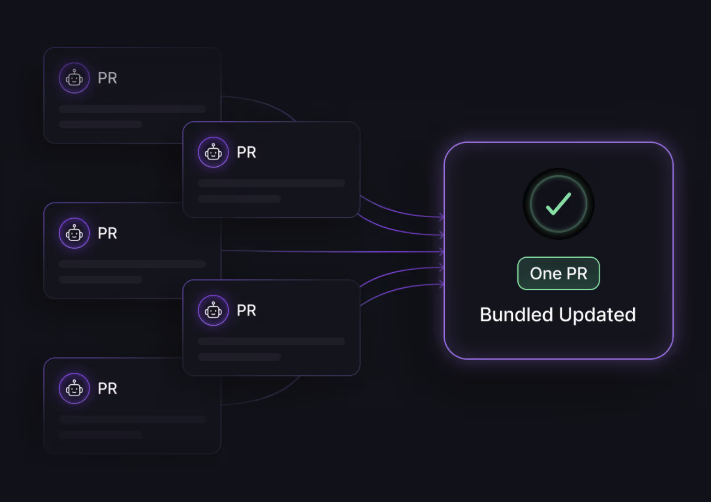
Dependabot creates work. The Bundler eliminates it.
- Dependabot opens a separate PR for every outdated dependency
- Teams with active repos see 20–50+ open Dependabot PRs at any given time
- Each PR requires a review, a merge decision, and CI to run
- Engineers deprioritize routine updates — security patches sit unmerged for weeks
- Breaking changes are buried alongside low-risk updates with no clear separation
- Compatible updates are automatically consolidated into one PR
- A single review covers all bundled changes with a clear summary
- Breaking changes are flagged and separated — never accidentally merged
- Each update is severity-rated so engineers know what needs attention first
- Non-breaking, low-risk updates can be configured for auto-approval
From Dependabot noise to one clean PR
Five steps, fully automated. Optibot handles everything from detection to consolidation.
- 01
Optibot monitors incoming Dependabot PRs
As soon as Dependabot opens pull requests on your repository, Optibot detects them and begins analysis. No manual triggering required — the bundler runs automatically in the background whenever new Dependabot PRs appear.
- 02
Each update is classified by severity and compatibility
Optibot analyzes each dependency update and assigns a severity rating — Low, Medium, High, or Critical — based on the nature of the change. It also assesses compatibility: which updates can be safely bundled together and which ones need to be kept separate because of breaking changes or version conflicts.
- 03
Compatible updates are consolidated into a single PR
Updates that are safe to bundle together are consolidated into one clean pull request. The bundled PR includes a comprehensive summary of every dependency included — what changed, what version it moved to, and what the security implications are. Your team reviews one PR instead of dozens.
- 04
Breaking changes are flagged and separated
Any update that introduces breaking changes is kept in its own PR and clearly flagged. Engineers don't have to hunt through a bundled PR to find the risky updates — they're separated out with explicit documentation of what the breaking change is and what implementation work may be required before merging.
- 05
Configure auto-approval for low-risk updates
For non-breaking, low-severity updates where your team has high confidence, you can configure the Dependency Bundler to auto-approve. This removes routine patch reviews from your queue entirely — your engineers only need to review what actually warrants human attention. Configure this from the Configuration tab in your Optibot dashboard.
Three things that change when you enable the Bundler
Your security patches actually get merged
When dependency updates pile up, teams naturally deprioritize them. Security patches sit unmerged for weeks — not because engineers don't care, but because the review queue is overwhelming. The Bundler collapses that queue. One PR is reviewable. Fifty PRs get ignored.
Breaking changes get the attention they deserve
The most dangerous pattern in dependency management isn't ignoring updates — it's accidentally merging a breaking change alongside a routine patch because they were bundled carelessly. Optibot's Bundler keeps them separate and documents exactly what the breaking change is before it lands on your team's desk.
Engineers stop wasting time on routine reviews
A Senior Engineer reviewing 40 Dependabot PRs one by one is an expensive use of engineering time. The Bundler consolidates that work into a single review with full context already written — severity ratings, compatibility analysis, and impact summaries included. What used to take hours takes minutes.
Built for teams where dependency management has become a bottleneck
Engineering Managers
Stop watching security patches sit unmerged for weeks because your team's Dependabot queue has become a low-priority backlog. The Bundler makes dependency reviews fast enough that they actually happen — and gives you visibility into what's critical versus what's routine.
Senior Engineers
You're the one who ends up reviewing Dependabot PRs because no one else has the context to judge what's safe to merge. The Bundler does the classification work upfront — severity ratings, breaking change detection, compatibility analysis — so when a PR lands on your desk it already has the context you'd otherwise spend time gathering yourself.
CTOs & VPEs
Unpatched dependencies are a known attack vector and a recurring audit finding. The Bundler removes the workflow friction that causes teams to deprioritize security updates — making it operationally easy to maintain a strong dependency hygiene posture without adding headcount or process overhead.
What you need to enable the Bundler
GitHub repository
The Dependency Bundler works with GitHub only. GitLab repositories are not supported.
Dependabot enabled
Dependabot must be active on the repository and generating dependency update PRs. The Bundler monitors and consolidates Dependabot PRs — it does not replace Dependabot.
GitLab not supported for this feature. The Dependency Bundler is GitHub-only and requires Dependabot. If your team uses GitLab, this feature is not available. All other Optibot features — automated MR reviews, summaries, CI fixer, and security scanning — work fully on GitLab.
Enable in one toggle
The Dependency Bundler is turned on from your Optibot dashboard:
- 1 Go to agents.getoptimal.ai and select your repository
- 2 Open the Configuration tab
- 3 Scroll to the Dependency Bundler section
- 4 Toggle Enabled to on
Changes take effect immediately. Optibot will begin monitoring new Dependabot PRs on the next Dependabot run.
Optional — configure auto-approval
For non-breaking, low-risk updates, you can configure auto-approval from the same Configuration tab. Combine this with Excluded Labels (e.g. breaking-change) to ensure breaking changes never get auto-approved regardless of severity rating.
Full configuration reference → Optibot configuration for dependency management

Frequently asked questions
Does the Dependency Bundler work with GitLab?
No. The Dependency Bundler is GitHub only and requires Dependabot to be enabled on the repository. All other Optibot features — automated MR reviews, summaries, CI fixer, and AppSec scanning — work fully on GitLab.
Does this replace Dependabot?
No. Dependabot still runs and generates the individual dependency update PRs. Optibot's Bundler sits on top of that — it monitors the PRs Dependabot creates, analyzes them, and consolidates compatible ones. Dependabot needs to be active on the repository for the Bundler to work.
How does Optibot decide which updates to bundle together?
Optibot analyzes each update for compatibility and breaking changes. Updates that are safe to bundle — no conflicts, no breaking changes, similar risk profile — are consolidated. Updates that introduce breaking changes or have potential conflicts are kept in their own separate PR and flagged explicitly.
Can I configure auto-approval for low-risk updates?
Yes. From the Configuration tab in your Optibot dashboard, you can configure auto-approval for non-breaking, low-severity updates. We recommend combining this with Excluded Labels (e.g. breaking-change, needs-review) to make sure any update that needs human eyes never gets auto-approved.
Does the Bundler store my dependency data or code?
No. Optibot operates under a zero data retention model. Your code and dependency information are analyzed ephemerally and never stored, logged, or used for model training.
// dependency bundler
One PR instead of fifty. Enable the Bundler today.
Turn on the Dependency Bundler from your Optibot dashboard settings and start consolidating Dependabot PRs immediately. GitHub repositories with Dependabot enabled only.